
Geolocation
You can search for properties near a specific location by using latitude and longitude coordinates in your query. The Business Data API supports geo-based searches using the geoLocation field, allowing you to find properties within a specified distance from a point. Simply provide the longitude, latitude, distance, and unit (e.g., miles, kilometers, meters) in your query. This is especially useful for identifying properties near a landmark, neighborhoods, or point of interest.
To use the API to do queries based around latitude and longitude values. For example, if you would like to find all properties within 10 miles of a specific point in Austin, Texas you could use the following query.
The format for a geolocation filter is: [Longitude,Latitude,Distance,Distance Unit].
longitude- longitude of the point where you want your radial search to start from.latitude- latitude of the point where you want your radial search to start from.Distance- integer value of the radius of the search.Distance Unit- unit of measurement the distance value represents.
Here's an example:
{
    "query":"geoLocation:[-97.7430600,30.2671500,10,mi]",
    "num_records": 3,
    "format":"json",
    "view":[
        {"name": "address"},
        {"name": "city"},
        {"name": "country"},
        {"name": "latitude"},
        {"name": "longitude"},
        {"name": "geoLocation"},
        {"name": "postalCode"}
    ]
}
An example from the response:
{
    "num_found": 164941,
    "total_cost": 3,
    "people_cost": 0,
    "property_cost": 0,
    "business_cost": 3,
    "product_cost": 0,
    "records": [
        {
            "address": "2900 W Anderson Ln",
            "city": "Austin",
            "country": "US",
            "latitude": "30.35950300",
            "longitude": "-97.73740400",
            "geoLocation": "POINT (-97.73740400 30.35950300)",
            "postalCode": "78757",
            "id": "AV1Ts0NS3D1zeR_xFHt-"
        },
        {
            "address": "614 E Oltorf St",
            "city": "Austin",
            "country": "US",
            "latitude": "30.237040",
            "longitude": "-97.749010",
            "geoLocation": "POINT (-97.749010 30.237040)",
            "postalCode": "78704",
            "id": "AWFfRuEs3-Khe5l_guaN"
        },
        {
            "address": "404 W 26th St",
            "city": "Austin",
            "country": "US",
            "latitude": "30.290628",
            "longitude": "-97.742004",
            "geoLocation": "POINT (-97.742004 30.290628)",
            "postalCode": "78705",
            "id": "4AYBDnUBodemSykC1fSK"
        }
    ]
}
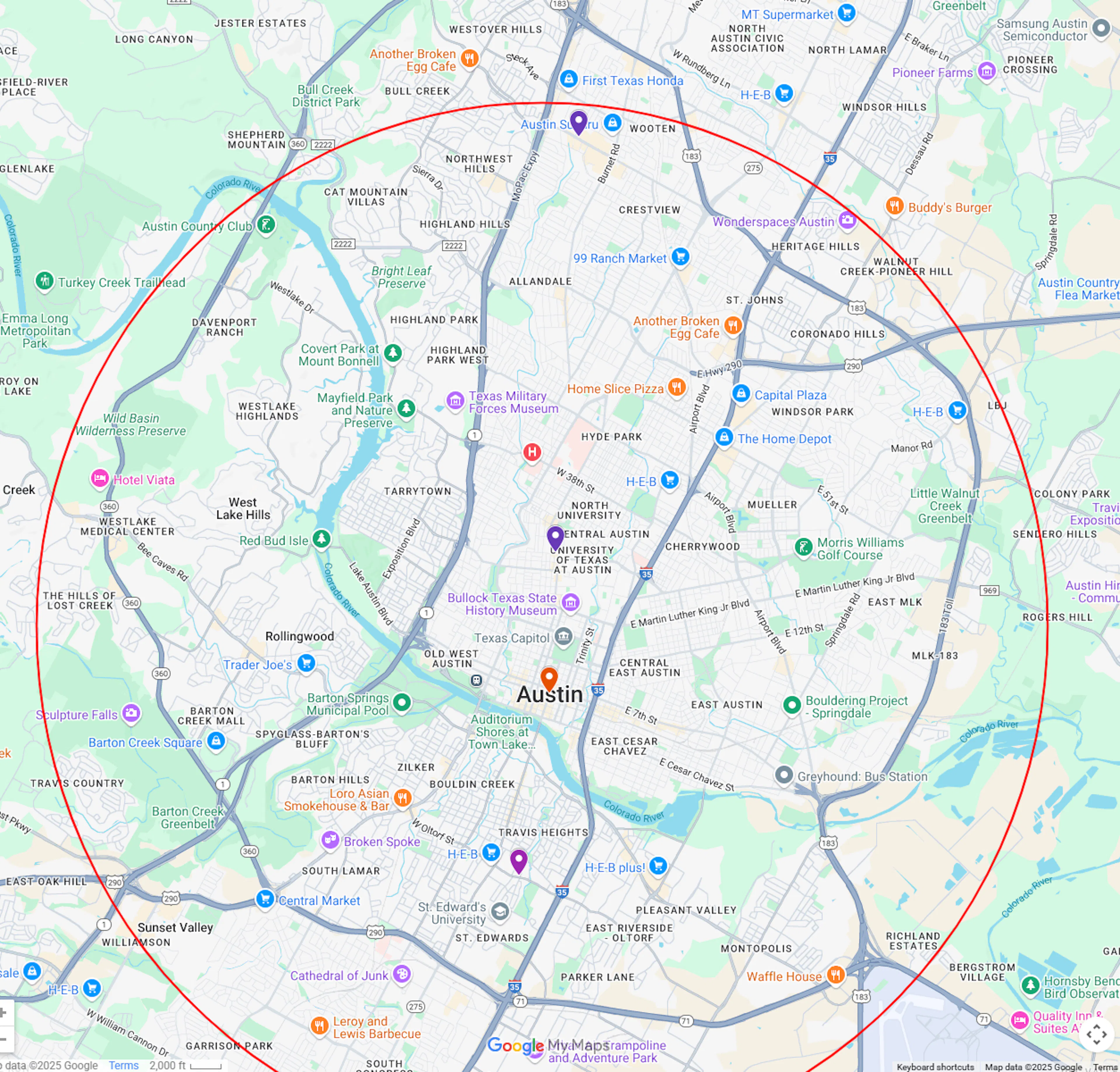
As you plot your result on a map you will see that the records returned are within a radius generated by the geolocation search.
Units of measurement
You can also use the following units for measuring distance:
m - meters
mi - miles
ft - feet
in - yards
mm - millimeters
km - kilometers
NM - nautical miles
cm - centimeters
Use cases
Check out some of our use cases that use geoLocation: